Update Expired Cards Directly From My Customers
iPOSpays now includes Card Updater support within the My Customers module, allowing merchants to update eligible expired customer cards directly from the customer profile.
Previously, expired cards often required manual updates, which could lead to recurring payment failures. With Card Updater, merchants can automatically apply eligible replacement card information when available.
This enhancement helps reduce payment disruptions and simplify recurring payment management.
Card Updater is currently available through a pilot program. To participate in the program, please contact your Dejavoo Sales Executive for assistance.
Feature Compatibility
- Minimum Required POS Build: Not Applicable
- Supported Users: Merchant Admins and Store Managers
- Supported Payment Methods: Saved Credit and Debit Cards (Visa and Mastercard only)
How It Works
Update Card Request
Merchants can update eligible saved cards directly from the customer profile.
- Log in to the iPOSpays portal using Merchant or Store Manager credentials.
- Navigate to My Customers, then search for and select the required customer.
- Under Card Details, click the Action/Menu button for the saved card.
- Select Update Card.
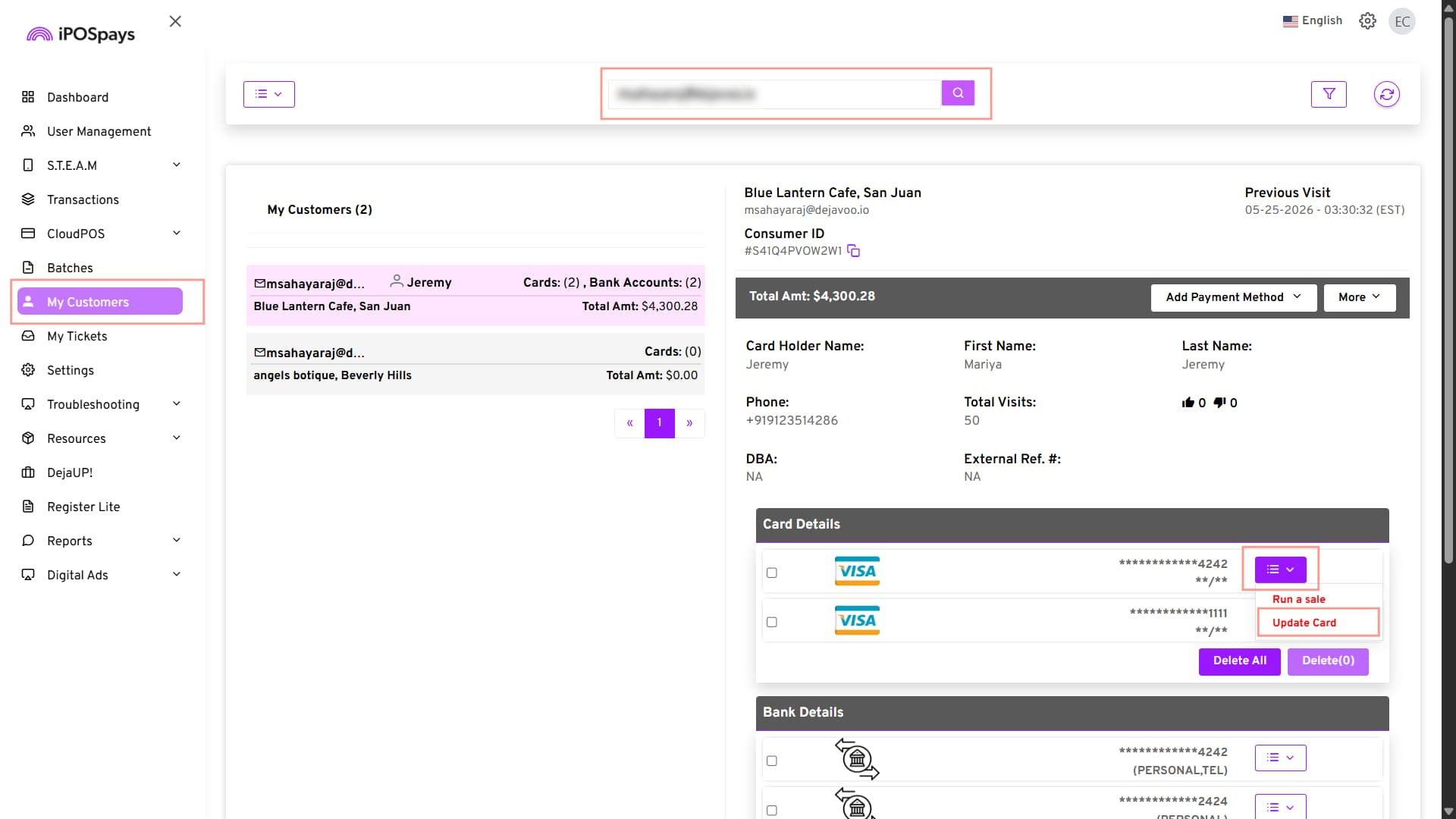
When the update request is submitted, iPOSpays communicates with the Card Updater service to check whether updated card information is available from the card issuer.
Update Status Messages
During processing, iPOSpays displays a status message while updated card information is being retrieved.
The update request can result in one of the following outcomes:
If updated card information is available:
- The customer’s saved card details are updated automatically.
- Existing customer records remain unchanged.
- Future transactions use the updated card information.
If updated card information is unavailable:
- The existing saved card remains unchanged.
- A notification is displayed indicating that no updated card details were found.
- Merchants can contact the cardholder to obtain updated payment information.
Recurring Payment Support
When a card update is successful:
- Associated recurring payment schedules are updated automatically.
- Future recurring payments continue using the updated card information.
- Merchants do not need to update recurring payment profiles manually.
Benefits
For Merchants
- Reduce payment interruptions caused by expired cards.
- Minimize manual maintenance of saved payment methods.
- Improve recurring payment success rates.
For Customers
- Reduce disruptions to recurring billing schedules.
- Maintain payment continuity when replacement cards are issued.